ComfyUI vs n8n: Why They Aren’t Competitors, and How to Combine Them
Two node-based interfaces, two very different jobs: ComfyUI produces media with AI models; n8n coordinates data, services, and teams. The real power shows up when you combine them.
At first glance, ComfyUI and n8n appear to speak the same language: boxes, connections, and a workflow you can inspect. Yet one deals in models, VRAM, and pixels; the other moves events, HTTP APIs, and business decisions.
Setting them against each other is far less useful than knowing where the boundary between them belongs. ComfyUI builds. n8n coordinates. And when the need justifies it, an agentic layer prepares a decision or applies rules under supervision.
Two Visual Graphs, Two Different Jobs
Node-based interfaces all rest on a simple logic: an input, a transformation, an output. That visual representation carries one major advantage: it makes processes visible, editable, and reusable.
It’s also an answer to tools that are too opaque. Where an all-in-one application tends to hide its settings and its intermediate steps, a node-based workflow lets you see exactly what is happening, and step in at any stage.
But a visually similar interface doesn’t mean an identical engine. ComfyUI and n8n carry fundamentally different responsibilities:
- ComfyUI is a generative production workshop.
- n8n is a process conductor.
- Flowise or Langflow can become a reasoning layer, once the LLM logic grows more complex.
ComfyUI vs n8n: The Comparison That Matters
| Dimension | ComfyUI | n8n |
|---|---|---|
| Mission | Generate or transform media with AI models | Orchestrate applications, data, and events |
| Resources | GPU, VRAM, models, media storage | CPU, memory, network, APIs |
| Dominant data | Images, video, audio, models, latents | JSON, events, identifiers, files, URLs |
| Trigger | Workflow launched locally or through an API | Webhook, email, schedule, SaaS event |
| Strengths | Fine-grained render control and experimentation | Integrations, business logic, error handling, notifications |
| Main limitation | Not optimized for business orchestration | Not built to run heavy GPU models |
| Scaling | Local render queue; multiple GPU instances must be orchestrated yourself | Native queue mode (workers + Redis) to absorb volume |
| Learning curve | Technical and creative (nodes, models, VRAM) | Process logic and low-code |
ComfyUI: The Generative Compute Workshop
ComfyUI is built to run media generation and transformation workflows. It shines wherever the compute gets heavy: image generation, animation, video, voice synthesis, voice cloning, or lip-sync. Now that the generated pixel has become a commodity, it’s control over the pipeline, rather than generation itself, that makes the difference.
Its home turf is models, weights, custom nodes, VRAM, and render queues. It lets you steer a creative chain with precision: which model to use, in what order to apply transformations, which parameters to expose, and how to reproduce a given result.
That level of control comes at a price: ComfyUI is not the right tool for watching a mailbox, listening for a webhook, handling team approvals, or publishing content across several services.
n8n: The Process Orchestrator
n8n does very nearly the opposite. Its role is to react to an event, move data between services, apply business rules, and deliver the result to the right place.
A new file lands in Google Drive? A form gets submitted? A video needs to reach Slack once approved? That’s n8n’s element. It can connect a vast catalog of SaaS integrations, call any HTTP API, apply conditions, handle loops, record metadata, and retry a task when something fails.
n8n can handle files and call remote models, but it is not a GPU render engine. Asking it to run a complex video workflow would be like using a telephone switchboard as an editing suite.
So Which One Should You Pick?
The answer is straightforward:
- You need to generate, transform, or render an image, a video, or audio: ComfyUI.
- You need to trigger a process, connect services, or distribute a result: n8n.
- You need both: n8n drives ComfyUI.
Mapping the Ecosystem: Every Tool Is a Trade-Off
ComfyUI and n8n don’t exist in isolation. They belong to a broader ecosystem where each tool represents a trade-off between control, simplicity, and operating cost. The point isn’t to pile up tools, but to understand the compromise each one embodies.
Visual Production: Control vs Simplicity
ComfyUI is aimed at people who want to control their generation pipeline down to the details. It’s powerful and highly extensible, but it demands a certain technical comfort, and often a machine with a suitable GPU.
InvokeAI takes an approach oriented more toward the creative experience and canvas-based editing. It can be more approachable for designers who want to work visually, without rebuilding every pipeline from low-level components.
At the other end, cloud tools like Krea, Freepik Spaces, and other hosted interfaces prioritize ease of entry. No local graphics card required, but more dependence on credits, on the provider’s limits, and on how the platform evolves.
The real choice, then, isn’t just a question of interface: it’s a trade-off between control, speed, and independence, the same trade-off that makes local open source the only genuine path to AI independence.
High-Resolution Photography: Keeping Hold of the Master
For a photographer, choosing local isn’t only about privacy or cost. An image from a 24, 45, or 60-megapixel sensor holds a level of detail that some SaaS interfaces reduce, normalize, or cap according to their own generation and export constraints.
With ComfyUI, the master file stays local and you choose your strategy: work region by region, process the image in tiles, correct sensitive areas, then upscale and inspect the result. The goal isn’t to pretend a model can faithfully regenerate fifty million pixels in a single pass, but to avoid surrendering your resolution and your pipeline to a limit set by a third-party service. It’s the same end-to-end discipline behind a structured photo workflow: the master never leaves your control.
That control matters most when the final image will be printed, cropped aggressively, or archived as a production file.
Automation: Freedom vs Speed
Make remains a benchmark for automating tasks between SaaS applications quickly. Its approach is highly accessible and particularly well suited to teams that want a scenario in production without managing infrastructure.
n8n becomes compelling once customization, self-hosting, data privacy, governance, or processing volume move to the top of the list. The point isn’t to “beat Make,” but to offer more freedom once automation becomes a strategic building block, and to keep your AI automation loops from turning into a dependency someone is selling you.
Flowise and Langflow: The Optional Reasoning Layer
Flowise and Langflow play a different role: they’re used to design decision chains around LLMs. RAG, memory, vector stores, tool calls, specialized agents, and guardrails can all be modeled visually.
They aren’t essential to every project. A simple language model call inside n8n may be plenty to summarize a text or classify an email. But when an agent has to consult a document base, choose among tools, or apply complex rules, that specialized layer earns its keep; it’s precisely the shift described in “RAG is dead, long live the Agent”.
The Hybrid Architecture: Every Tool in Its Place
The trap would be to picture a strictly linear pipeline: agent, then ComfyUI, then n8n. In practice, n8n frames the entire process: it triggers, tracks, retries, validates, and distributes.
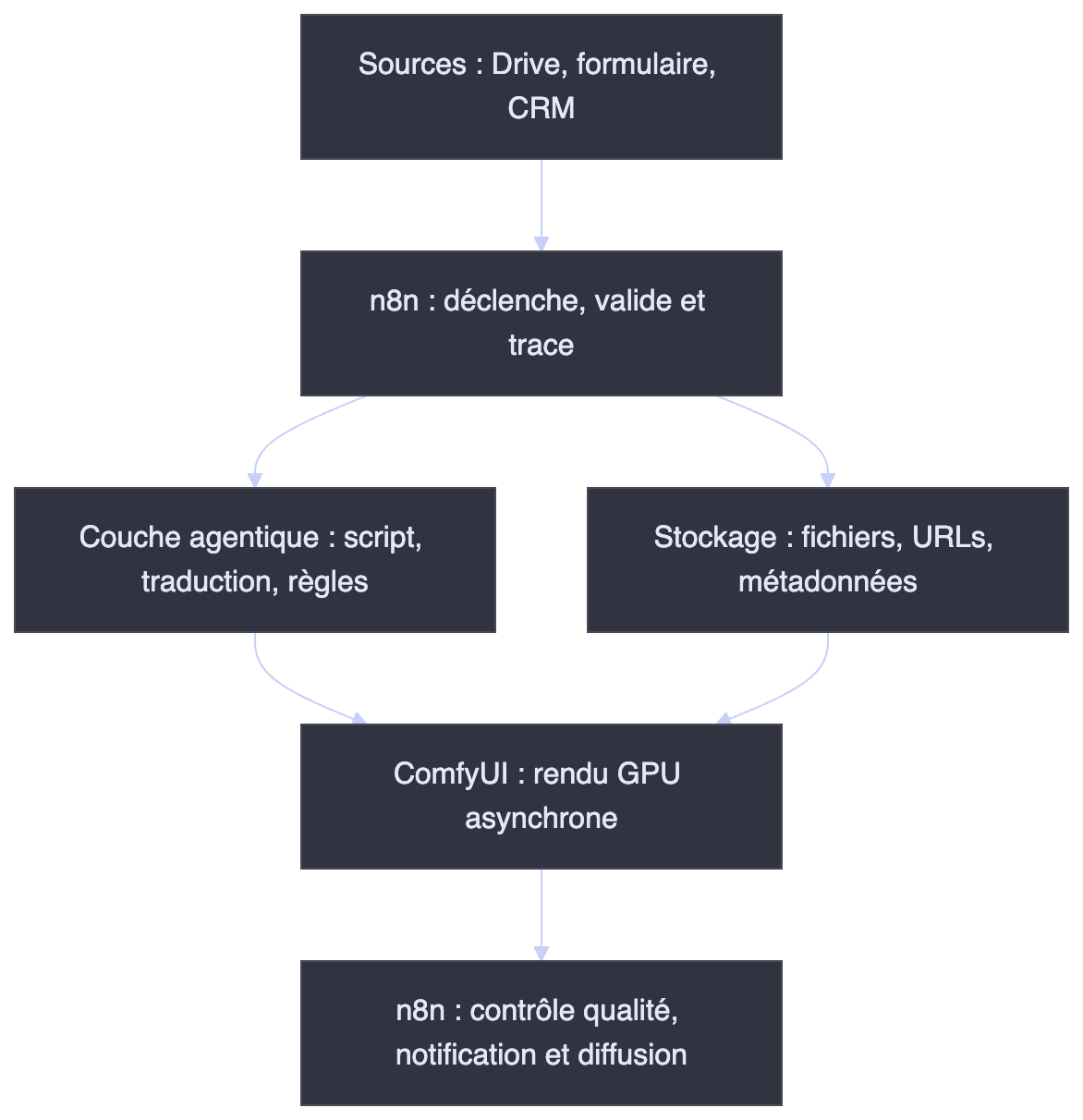
n8n: orchestrates the full cycle (trigger → tracking → distribution).
Agentic layer (optional): handles decision logic (translation, rules, glossary, and so on).
Dedicated storage: keeps heavy files from moving through every step.
ComfyUI: receives only asynchronous jobs (URLs + parameters) and returns a result.
This architecture rests on a few simple operating principles, which quickly become design rules:
Recommended architecture rules
- Dedicated storage: keep heavy files (video, audio, images) in object storage (S3, Google Drive, MinIO, and so on) rather than passing them through every step.
- A single production identifier: use one shared ID across n8n, ComfyUI, and the agentic layer to trace the entire lifecycle.
- Asynchronous processing: treat ComfyUI renders as asynchronous jobs: submit the job, track it (polling or WebSocket), retrieve the result.
- Retries and human validation: plan for error recovery (including VRAM exhaustion and out of memory failures) and a human review before any irreversible publication.
- Clear separation of responsibilities: n8n orchestrates, ComfyUI renders, and the agentic layer prepares a decision or applies rules under supervision. Don’t blur the roles.
- Securing the ComfyUI API: by default, ComfyUI exposes its API without authentication. The moment it stops being strictly local, put it behind an authenticated reverse proxy, a VPN, or a private network. A render engine reachable from the open internet is a GPU handed to the first passerby.
- Decoupling infrastructure costs: run n8n on a lightweight server (or ordinary cloud instance) and ComfyUI on an on-demand GPU instance (RunPod, serverless, and so on). You pay for the GPU only while renders are actually running, allowing for cold-start costs, model storage, and data transfer. Because local AI isn’t paid for twice, but three times: the hardware, the energy, and the operating time.
That decoupling is often the single most decisive economic lever: orchestration stays cheap and always available, while compute power is provisioned only on demand.
A Concrete Case: A Video Translation and Lip-Sync Factory
Picture a team that regularly receives videos to adapt for several markets, at a moment when machine translation is dissolving language barriers.
1. Intake and Preparation: n8n
n8n detects a video dropped into Google Drive or submitted through a form. It checks the format, creates a production identifier, moves the file into appropriate storage, and notifies the people involved.
Audio extraction and transcoding can be handed off to a dedicated media service. The goal is to prepare clean assets before calling on any AI component.
2. Transcription, Adaptation, and Review: AI Agent
The script is transcribed, then sent to an LLM to be translated. But a good translation isn’t a matter of swapping words: it has to respect tone, cultural references, sentence duration, and the synchronization the final render expects.
This is where an agentic layer can add real value, particularly when it needs to consult a brand glossary, past translations, or editorial rules. Human review remains valuable, especially for anything published publicly.
3. Render and Lip-Sync: ComfyUI
Once the text is approved, n8n calls the ComfyUI workflow through its REST API (the /prompt route). The prompt field must contain the complete graph in the API format exported from ComfyUI. Input files (video, audio, and so on) first have to be made available to the server: either placed in its input directory (through the /upload/image route, for example) or referenced by loader nodes already present in the workflow. Simply dropping them into extra_data won’t inject them automatically.
Here is a conceptual outline, to be adapted to the nodes you actually have installed:
{
  "prompt": { /* complete graph exported in API format */ },
  "client_id": "prod-2026-08-12-001"
}
Code language: JSON / JSON with Comments (json)
Worth noting: client_id exists primarily to route WebSocket messages back to the right client. Reusing it as a production identifier works, and kills two birds with one stone where traceability is concerned.
ComfyUI then queues the workflow and returns a prompt_id. Native tracking happens either:
- by polling
/history/{prompt_id}, - or over a WebSocket connection to the local server.
An outbound callback or webhook isn’t provided natively and requires an additional layer (a custom node, an intermediate service, or logic on the n8n side).
That tracking loop is also the ideal place to catch the classic hardware failures (VRAM exhaustion, out of memory). n8n can then retry the job with lighter parameters, switch to a larger GPU instance, or alert the team before the whole chain stalls.
ComfyUI can then generate a new voice track with the chosen model and apply lip-sync to the original video.
4. Checks, Storage, and Distribution: n8n
The final render gets verified: the file exists, the format matches, the duration is consistent, and the storage location is correct. n8n can then archive the video to S3 or Google Drive, notify the team on Slack, and schedule publication once approved.
Automation speeds up production, but it doesn’t replace the decisions that matter: consent for voice cloning, rights over the content and the models, media confidentiality, linguistic quality, and a final visual check.
Conclusion: Choose an Architecture, Not a Winner
The best workflow isn’t the one that stacks the most nodes. It’s the one that hands rendering to a render engine, orchestration to an orchestrator, and decision preparation to a layer genuinely capable of taking it on under supervision.
ComfyUI and n8n, then, aren’t competitors. Together, they make it possible to design creative production chains that are more modular, more controllable, and better matched to what a team actually needs.
Quick decision grid:
- My bottleneck is the render (images, video, audio) → ComfyUI
- My bottleneck is triggering, coordination, or distribution → n8n
- Both coexist in my pipeline → hybrid architecture (n8n drives ComfyUI)
The question is no longer “Which tool is best?” It’s this: in your production chain, where is the real bottleneck today?