wp_options : archaeology of a technical debt with no owner
When you take over a WordPress site that has lived a little, say three or four years, with its share of plugins tried, abandoned, replaced, and themes that came and went, you quickly discover that the real problems aren’t in wp-content/. They’re in the database. More precisely, in a table no one ever looks at: wp_options.
The silent mechanism dragging down your performance
On every page load, WordPress runs a query equivalent to this:
SELECT option_name, option_value
FROM wp_options
WHERE autoload = 'yes';
Code language: SQL (Structured Query Language) (sql)
This query pulls into memory every option marked as “autoloaded”, that is, loaded automatically on every request without being asked for explicitly. The idea is good on paper: sparing PHP from multiplying queries for frequently used parameters.
The problem is that WordPress’s add_option() function defaults to $autoload = 'yes'. In other words, the moment a plugin developer writes add_option('my_plugin_setting', $value) without thinking about the autoload parameter, their option joins the stack loaded on every page, ad vitam æternam.
Multiply that by the hundreds of plugins that will pass through a site over its lifetime, add the fact that uninstalling a plugin via the WordPress interface almost never removes the options it created, and you get what we observe in practice: wp_options tables that run to 5, 10, sometimes 20 megabytes in pure autoload, half of it belonging to plugins gone for three years.
The real cost: deserialisation and alloptions
Reducing the problem to “a slightly heavy SQL query” would be to miss the essential. The dominant cost isn’t the SELECT itself, but what PHP then does with it. Once the data is pulled in, WordPress systematically applies maybe_unserialize() to each value, and it’s this deserialisation that consumes the most CPU. The more the options contain complex serialised structures (nested arrays, PHP objects), the harder the interpreter sweats, and that’s before a single line of template has been rendered.
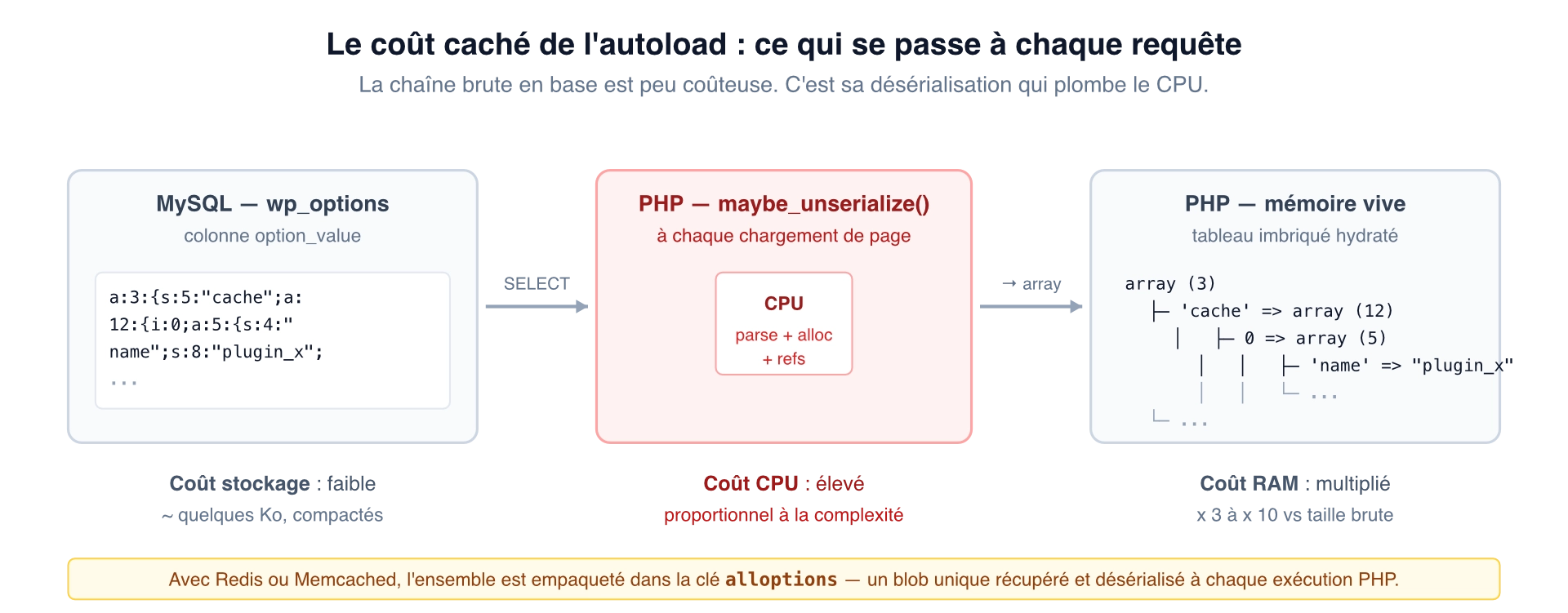
When an object cache (Redis or Memcached) is in place, the problem changes nature without disappearing. WordPress stacks all the autoloaded options into a single cache entry named alloptions. This blob is fetched on every PHP execution and deserialised in full, even if the code uses only a tiny part of it. Worse: if the size of this blob exceeds the limit of a memory slot, 1 MB by default on Memcached, the write fails silently and every request falls back to MySQL. The object cache, meant to relieve the database, then becomes pure overhead: you pay the cost of the attempted write and that of the SQL fallback.
That’s what makes the subject structurally critical: a site with an obese autoload isn’t just a slow site, it’s a site that can silently make the very optimisations you deploy to save it fail.
The diagnosis, in two queries
To measure the scale of the problem on a given site:
SELECT
  COUNT(*) AS num_options,
  ROUND(SUM(LENGTH(option_value))/1024/1024, 2) AS size_MB
FROM wp_options
WHERE autoload = 'yes';
Code language: PHP (php)
Beyond 1 MB loaded in autoload, it’s already concerning. Beyond 3 to 4 MB, it’s critical; each page takes time to build before a single line of business PHP has even run.
To identify the culprits:
SELECT
  option_name,
  ROUND(LENGTH(option_value)/1024, 2) AS size_KB
FROM wp_options
WHERE autoload = 'yes'
ORDER BY LENGTH(option_value) DESC
LIMIT 20;
Code language: PHP (php)
You’ll be surprised. Regularly, it’s a cache option a plugin forgot to purge, a serialised list that grew without limit, or a poorly designed event log. WP-CLI offers a more readable syntax for the same purpose:
wp option list --autoload=on --orderby=size --order=DESC --format=table
Code language: PHP (php)
At this point, you have a list. What remains is to find out what these lines represent. That’s where the real nightmare begins.
The archaeology: decoding what Google doesn’t know
First reaction faced with a mysterious option name: you type it into Google. And there, surprise: no results. Or a few fragments of source code on archive repositories, without the slightest documentation.
Search for kcseo_wp_schema. After a few attempts, you’ll painfully find that it’s the WP SEO Structured Data Schema plugin. Why kcseo? Because it’s the author’s handle (kcseopro), and because they prefixed all their PHP classes with KcSeo. The plugin’s commercial name, what the user sees in their back office, appears nowhere in the technical prefix.
Search for adt_pfp_. With some effort, you’ll work out that it’s the Product Feed PRO for WooCommerce plugin, published by AdTribes. adt for AdTribes, pfp for Product Feed Pro. None of these fragments appears in the plugin’s commercial name. To make the connection, you have to know the publisher is called AdTribes, information you only find by reading the WordPress.org listing.
This isn’t anecdotal. It’s systemic. WordPress imposes strictly no naming convention on its plugins. Each publisher invents its own logic, and the result is an unmanageable patchwork.
Typology of prefixes: seven patterns observed in the wild
After auditing a few dozen existing databases, you can sort the practices into seven categories. From the healthiest to the most catastrophic:
| Pattern | Logic | Example | Decoding |
|---|---|---|---|
| 1 — Direct commercial name | The prefix matches the plugin name | woocommerce_*, yoast_*, elementor_* | Immediate |
| 2 — Acronym of the commercial name | Decipherable acronym | aioseo_* (All In One SEO), aiowps_* (All In One WP Security) | Possible with effort |
| 3 — Publisher abbreviation + product abbreviation | Two stacked acronyms | adt_pfp_* (AdTribes Product Feed Pro) | Difficult |
| 4 — Author handle | Developer’s pseudonym | kcseo_* (author kcseopro, plugin “WP SEO Structured Data Schema”) | Very difficult |
| 5 — Multiple coexisting prefixes | Rebuild or poorly cleaned-up evolution | yit_*, yith_*, YITH_WAPO_* (all YITH) | Confusing |
| 6 — Inherited prefix | Acquired plugin keeping its old prefix | Variable | Untraceable without archaeology |
| 7 — No identifying prefix | wp_subscribers, wp_logs, etc. | — | Impossible |
YITH deserves a box of its own, in fact: they simultaneously use yit_ (historic prefix), yith_ (current prefix), YITH_WAPO_ (prefix specific to the add-ons module), and even kebab-case variants like yith-wcqv-. All coexisting in the same database. When you uninstall a YITH plugin, identifying all the options to purge is a matter of criminal investigation.
Two-storey pollution
The problem doesn’t stop at wp_options. Plugins also create custom tables, wp_xyz_logs, wp_xyz_data, etc., which cheerfully survive any uninstallation if the plugin hasn’t implemented a clean uninstall.php.
And there, the problem changes scale:
- A forgotten option weighs a few kilobytes and drags down the TTFB.
- A forgotten table can weigh several gigabytes, drag down backups (interminable
mysqldump), slow MySQL maintenance operations, and complicate any site migration or cloning.
The table naming conventions follow exactly the same chaotic patterns as the options. You find the same seven categories above, with the nuance that some tables have no identifying prefix beyond the standard wp_. Coming across an 800 MB wp_logs table in an inherited database is a recurring experience. No one knows whom it belonged to. The plugin vanished two years ago. The table remains.
The root cause: a double failure
Why are we here? Two reasons compound.
First reason: a cultural shortcoming among plugin developers. The WordPress ecosystem, by its ease of access, long attracted a motley population of developers, from the rigorous professional to the self-taught who copy-pastes bits of code. Many never gave a thought to the lifecycle of their data. For them, “uninstalling” a plugin means deactivating it. What stays in the database is not their concern. As for prefixing their options according to a convention a third party could understand, that’s a comfort detail they don’t imagine having any impact on anyone.
Second reason: an architectural shortcoming of WordPress itself. This is neither the first nor the last symptom of a CMS showing the limits of its historic model. Compare it with more disciplined ecosystems:
- Composer imposes strict namespacing (
vendor/package). - npm validates package names and manages dependencies explicitly.
- Maven enforces a
groupId:artifactId:versionscheme.
For twenty years, WordPress has let every plugin name its options and tables however it likes. The add_option() function sets autoload = 'yes' by default, with no warning, no documentation urging caution. The register_uninstall_hook() hook exists but is mandatory for no one. The uninstall.php file is optional. And the API provides no discovery mechanism letting the administrator find out, after the fact, which plugin a given option or table belonged to.
In other words: WordPress provides the cleanup tools but compels no one to use them, and offers no traceability mechanism when they haven’t been.
What the plugins that don’t rot do
Not all developers are negligent. A minority apply good practices that, taken together, would suffice to fix most of the problem if they were widespread:
- Implement
register_uninstall_hook()or provide anuninstall.phpfile. The official mechanism exists to purge options, tables and other traces on uninstallation. The code is trivial to write. Setting it up takes ten minutes. - Use the third parameter of
update_option(). The full signature isupdate_option($option, $value, $autoload = null). Passingfalseexplicitly when the option isn’t meant to be loaded on every page is showing a minimum of respect for one’s users and their servers. - Favour transients and the object cache. For volatile or bulky data (caches, aggregates, computation results), the
set_transient()/get_transient()pair or an external object cache (Redis, Memcached) is infinitely more appropriate thanwp_options, on the understanding that in the absence of an object cache, transients land inwp_optionsthemselves. A plugin that creates hundreds of transients with no expiry (or badly managed ones) directly contributes to the table’s obesity, even if they’re not in autoload. Expiry discipline and periodic cleanup are as essential as the choice of API. - Externalise large objects. Recent cache or analytics plugins adopt a “single option pointer” approach: the
wp_optionstable stores only an identifier, and the actual data is kept in a dedicated table or a file on disk, off the autoload critical path. - Document the options created. A dedicated section in the
readme.txtlisting theoption_namevalues introduced by the plugin lets any administrator trace responsibilities, years later, when the plugin has vanished and its author no longer answers.
None of these practices is exotic. None demands significant effort. All exist in the official documentation. The problem is that nothing obliges anyone to apply them, and that rigour remains the exception, not the rule. This is precisely the discipline I strive to apply on my own plugins, whether WP4Odoo or WooCommerce Subscriptions Tax Retrofit: a prefix consistent with the official slug, an uninstall.php that actually purges, the third parameter of update_option() set deliberately. It’s not zeal, it’s the minimum we owe the administrators who will inherit these traces in ten years.
An audit methodology, for want of a miracle solution
Let’s be honest: there’s no tool that magically solves the problem. The existing plugins, Advanced Database Cleaner, WP-Sweep, WP-Optimize, work by heuristic: they try to match option prefixes to active plugins, and flag the “orphans”. But their detection has false positives and, above all, it can’t know with certainty that an option is useless. The risk of breaking something is real.
The method I apply on inherited sites:
- Quantified audit. Measure the total autoload weight and list the twenty biggest contributors.
- Cross-reference with active plugins. For each unknown prefix, try to identify the plugin (searching for fragments of the name in the active and inactive
wp-content/plugins/files). If nothing matches, suspect an orphan. - Manual search in public repositories. When the prefix turns up nothing on Google, sites like pluginarchive.com, github.com or the WordPress.org SVN sometimes let you trace back to a vanished plugin.
- Backup before any deletion. Always. Including for options that seem obviously orphaned.
- Progressive deletion with testing. Disable autoload first (
autoload = 'no'), observe the site’s behaviour over a few days, then delete. - Similar audit of custom tables.
SHOW TABLE STATUSto identify abnormally large tables, cross-reference with active plugins, check the last modification date. - Hunting down orphaned transients. WordPress doesn’t systematically auto-purge transients whose expiry has passed. A counting query lets you measure the scale of the residue:
SELECT COUNT(*) FROM wp_options WHERE option_name LIKE '_transient_timeout_%' AND option_value < UNIX_TIMESTAMP();If the counter exceeds a hundred or so, a cleanup is called for;wp transient delete --expiredsorts that out in one command.
It’s artisanal, it’s slow, and it’s not glamorous. But it’s what works.
What would be needed, and what will probably never happen
A real solution would require WordPress to impose, or at the very least strongly recommend, a standard of the form:
- An option and table prefix consistent with the plugin’s official slug.
- A declarative manifest in the
readme.txtlisting the options and tables created. - A discovery mechanism allowing you to trace, from an orphaned option, the plugin that created it.
- A mandatory
uninstall.php, or one auto-generated from the manifest.
None of these changes is technically complex. All are culturally improbable: WordPress has made permissiveness a trademark, and any constraint imposed on third-party developers would make part of the community howl. It’s precisely this permissiveness that enabled the ecosystem’s rise, and that today makes it its hidden cost. The attempts at a rebuild emerging elsewhere, EmDash, the sandboxed CMS Cloudflare is building for the age of AI agents, among others, start precisely from the realisation that you can no longer let a third-party plugin write what it wants, where it wants, with no traceability.
While we wait for such a standard to emerge, which is to say never, what remains is archaeology, the well-aimed SQL query and patience. As long as WordPress remains a house open to all winds, wp_options will remain the attic where the memories of former tenants pile up.