E-invoicing 2026 : your WooCommerce, PrestaShop, or Shopify store isn’t compliant
If you run an online store and your invoices still go out as PDFs over email, you’re behind. Not behind in the “something to look into someday” sense, but behind in the sense that the deadline is set for September 1, 2026, and getting compliant isn’t a one-click affair.
This is a practical guide. Not a news piece that boils the reform down to five bullet points. A guide for people who actually sell online and want to know what’s changing, what they need to do, and which tools to do it with.
What the Reform Actually Requires
The e-invoicing reform isn’t just about “digitizing your invoices.” It mandates a complete pipeline that is structured and traceable end to end.
Three distinct obligations come into play:
E-invoicing covers B2B exchanges between French companies subject to VAT. Invoices must be issued in a structured format (Factur-X, UBL, or CII) and must travel through an Accredited Platform (AP), a private operator registered with the DGFiP, France’s tax authority. A PDF emailed to a client is not an electronic invoice in the eyes of the reform. This isn’t a fine distinction: it’s a clean break with the way things work today.
E-reporting covers the transactions that fall outside e-invoicing: sales to individuals (B2C), international transactions, and intra-EU trade. Here the obligation isn’t to send your customer a structured invoice but to transmit summary data about your transactions to the tax authority, again through an AP. This is the point B2C-only merchants tend to overlook: they aren’t exempt, just subject to a different regime.
⚠️ The “I only do B2C” trap. Plenty of online stores assume the reform doesn’t apply to them because they sell only to individuals. Wrong. E-reporting applies the moment you’re subject to VAT, and it follows the same timeline as e-invoicing. You still need an AP. You still have to transmit data. The only difference: instead of sending your customer a structured invoice, you send a stream of data to the tax authority.
Receiving is the obligation that hits everyone on September 1, 2026, regardless of company size. Even if you aren’t yet required to issue electronic invoices, you must be able to receive them. That means having designated an AP before that date.
VAT OSS and International Sales
One point most guides skip over: if you sell to individuals in other EU countries, you fall under the VAT OSS regime (One Stop Shop, a single EU-wide reporting window) as soon as your cross-border sales exceed €10,000. E-reporting covers these transactions, but handling them correctly means knowing the exact VAT rate that applies in each destination country.
Native WooCommerce plugins routinely trip over these per-country thresholds: wrong calculations, misapplied rates, no usable OSS report to show for it. Tools like Pennylane and Odoo handle VAT OSS natively, producing filing reports your accountant or tax adviser can use directly. If you sell across Europe, that’s one of the strongest arguments for moving to an integrated solution.
The Timeline
| Date | Obligation |
|---|---|
| Sept. 1, 2026 | Receiving mandatory for all businesses |
| Sept. 1, 2026 | Issuing mandatory for large companies and mid-market firms (ETI) |
| Sept. 1, 2027 | Issuing mandatory for SMEs, small businesses, and micro-enterprises |
So if you’re a small business or SME selling B2B, you have until September 2027 to start issuing, but receiving applies to you as early as 2026. And choosing an AP takes time.
The Penalties
Failing to choose an AP triggers a formal notice from the tax authority, giving you three months to fix it plus a €500 fine. For each invoice not issued in electronic format: €50 per invoice (capped at €15,000 a year under the 2026 Finance Act). Missing e-reporting transmissions are penalized at €500 each (also capped at €15,000). These figures may feel abstract for a small store; they stop feeling abstract the moment the tax office takes a serious interest.
The Crux of the Problem for Online Stores
Your e-commerce CMS, whether it’s WooCommerce, PrestaShop, Magento, or Shopify, was never designed to be a regulatory invoicing platform. It was designed to sell.
The usual invoicing plugins (WooCommerce PDF Invoices & Packing Slips, Flexible Invoices, and the like) generate “flat” PDFs with no embedded XML structure. They don’t talk to an AP. They don’t capture the fields the reform requires (the buyer’s SIREN business ID, the transaction category, the delivery address). And they don’t do e-reporting.
So the question isn’t “how do I make my plugin compliant?” The question is: which management tool will I connect my store to, so that legal invoicing happens outside the CMS?
The Right Architecture
The split is clean and healthy:
| Function | CMS (WooCommerce, Shopify…) | Invoicing solution (AP) |
|---|---|---|
| Cart, order, payment | ✅ | — |
| Catalog and inventory management | ✅ | — |
| Customer experience, emails | ✅ | — |
| Factur-X invoice generation | — | ✅ |
| Transmission via AP | — | ✅ |
| VAT e-reporting | — | ✅ |
| 10-year tax archiving | — | ✅ |
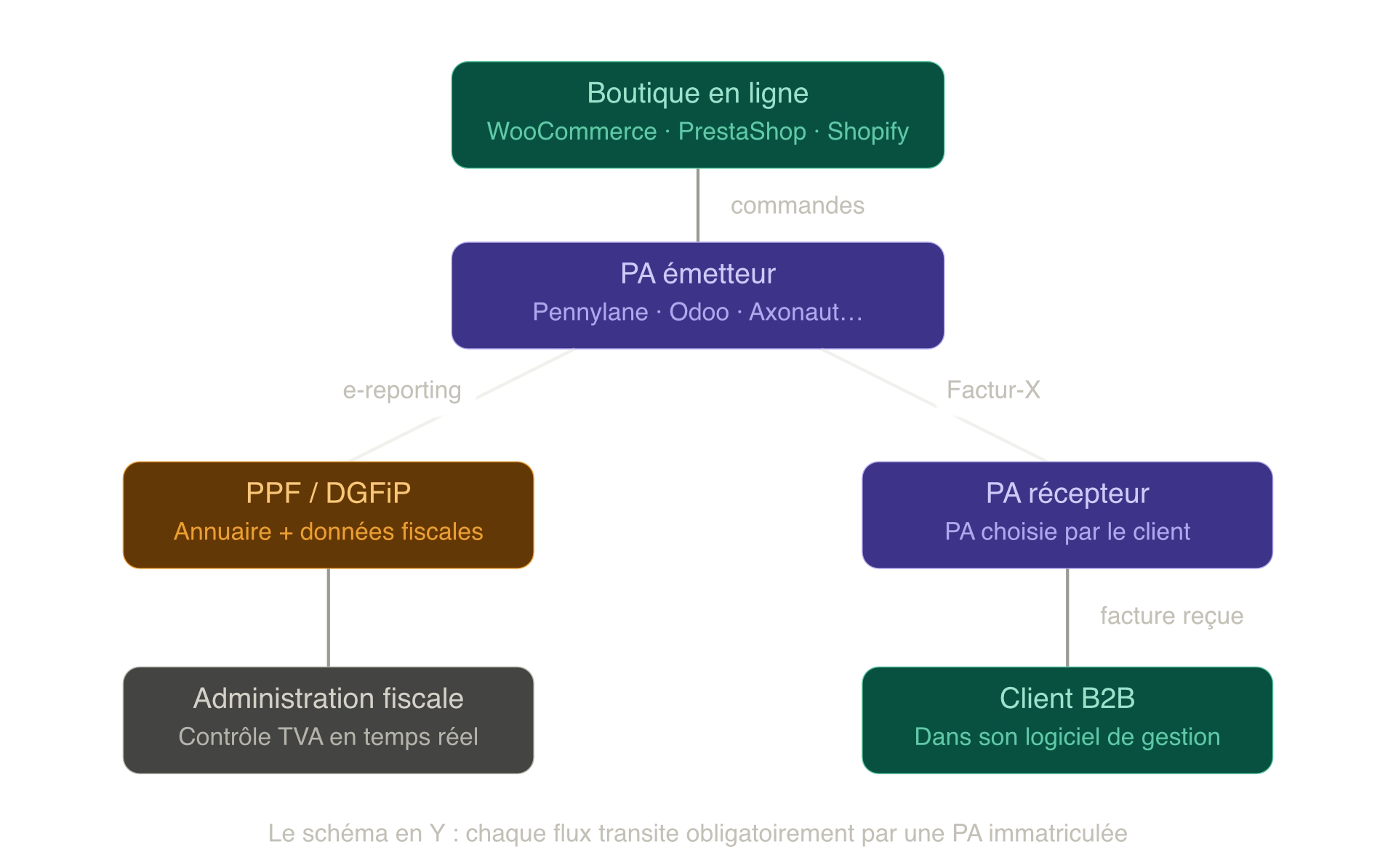
The CMS stays the storefront. Legal invoicing lives elsewhere. This isn’t a step backward: it’s a clarification of roles that many businesses should have made well before 2026. The same logic applies to WordPress architecture in general: needlessly complicating a stack rarely benefits the people who adopt that complexity without good reason.
Practical Notes by CMS
WooCommerce
WooCommerce is the best-served CMS when it comes to native connectors for this reform. Several Accredited Platforms offer a direct integration:
Pennylane is currently the most polished solution for WooCommerce. Registered as an AP with the DGFiP, it offers an official connector that automatically pulls each WooCommerce order into Pennylane, generates the Factur-X invoice, transmits it to the client’s AP, and handles e-reporting. Everything runs with no manual intervention. The Essentiel plan (starting at €99/month for a company) is required to access the e-commerce integrations. For a business that already works with an accountant, it’s probably the most sensible choice on the French market.
Axonaut, also a registered AP, offers a dedicated WooCommerce plugin that automatically turns orders into compliant invoices. More B2B- and CRM-focused than Pennylane, it’s a good option if you manage a structured commercial relationship with your business clients.
Odoo deserves a category of its own. Registered as an AP with the DGFiP (you can verify this on the official list), Odoo has supported Factur-X natively since version 14 and offers several third-party WooCommerce connectors. These include WP4Odoo, an open-source plugin that syncs WordPress/WooCommerce and Odoo in both directions with no commercial middleman, as well as the connectors from VentorTech and Emipro. Odoo’s strength is that it unifies sales management, accounting, inventory, and invoicing in a single environment. It’s the most coherent long-term option if your business warrants an ERP.
If you’re considering Odoo not just for compliance but as a genuine hub between your store, your accounting, and your bank (live bank synchronization, multichannel inventory management, European VAT OSS), I’ve covered the full architecture in a dedicated article: Odoo as a hub between my online store and my bank: is it a good idea? I’ve also released an open-source module to automate the digitization of supplier invoices in Odoo using AI, which slots naturally into this pipeline.
If you’ve recently crossed the VAT threshold and your WooCommerce subscriptions are still recorded tax-inclusive with no breakdown, this migration topic deserves special attention. I went through it firsthand and built a dedicated plugin for it: WooCommerce Subscriptions Tax Retrofit.
⚠️ Beware of fake accreditation. Solutions like efacturx.com present themselves with ambiguous language (“AP routing,” “2026-compliant”) without actually being registered APs themselves. They do generate valid Factur-X, but for legal transmission you’ll have to subscribe separately to a genuine AP. The official list of registered APs is available on impots.gouv.fr. Check any solution against it before you sign.
PrestaShop
PrestaShop has a thinner module ecosystem than WooCommerce on this specific topic, but the logic is identical: connect the store to an AP-compatible management tool. That said, the lack of continuity between PrestaShop’s major versions makes auditing the connector even more critical here than elsewhere: confirm exact compatibility with your version before committing to anything.
Pennylane supports PrestaShop natively via Chift, with the same automatic sales-import mechanism. For businesses already running an ERP, Cegid (a registered AP) offers PrestaShop connectors within its ecosystem.
For a more technical integration, PrestaShop’s native webhooks let you build a custom connector to any AP that exposes a REST API, an approach worth considering for high volumes or specific business workflows.
Magento / Adobe Commerce
Magento targets larger organizations, which usually already run an ERP. In that case, the question isn’t “which plugin do I install” but “how do I connect my existing ERP to an AP.”
APs such as Esker, Generix Group, and Edicom (all registered) offer Magento connectors or REST APIs for a custom integration. For businesses without an ERP, the Pennylane or Axonaut approach still works, via the Magento API.
Shopify
Shopify runs in a closed SaaS environment, which simplifies some webhook-based integrations but limits the “native plugin” options. Pennylane supports Shopify natively, with the same logic as for WooCommerce. It’s currently the smoothest solution for French Shopify stores subject to the reform.
For B2B Shopify merchants with high volumes, an integration through Make or Zapier to a REST-based AP is a viable alternative: more fragile than a native connector, but it works.
Solution Comparison
| Solution | Registered AP | WooCommerce | PrestaShop | Shopify | Indicative pricing |
|---|---|---|---|---|---|
| Pennylane | ✅ Yes | ✅ Native | ✅ Native | ✅ Native | €99/month (Essentiel) |
| Axonaut | ✅ Yes | ✅ Plugin | ⚠️ To verify | — | On quote |
| Odoo | ✅ Yes | ✅ Third-party connector | ✅ Third-party connector | — | Depends on version |
| Evoliz | ⚠️ To confirm | ✅ Connector | — | — | ~€30/month |
| efacturx.com | ❌ No (CS) | ✅ Native plugin | — | — | €29–99/month + AP |
| FactureXPress | ❌ No (CS) | ✅ Plugin | — | — | On quote + AP |
CS = Compatible Solution. Generates valid Factur-X but must rely on a third-party Accredited Platform (AP) for legal transmission. See the “What the Reform Actually Requires” section for details.
What You Need to Do Now
1. Identify your regime. Do you sell mainly to individuals (B2C) or to businesses (B2B)? If it’s B2C only, e-reporting is enough for now. If it’s B2B or mixed, e-invoicing applies to you directly.
2. Check your VAT status. If you’re under the VAT exemption scheme (a sole trader below the threshold), receiving applies to you from 2026 and issuing from 2027, but the regime is simplified. If you’ve recently crossed the threshold, managing cash flow around tax catch-up payments deserves close attention.
3. Choose an AP before September 2026. Even if your obligation to issue invoices doesn’t start until 2027, you must be able to receive electronic invoices from 2026. Designate an AP now. The official list of registered accredited platforms is available and regularly updated on impots.gouv.fr.
4. Audit your checkout. The reform requires fields your order forms probably don’t collect yet: the B2B customer’s SIREN/SIRET business ID, their intra-EU VAT number, and the transaction category (sale of goods, provision of services, or a mix). This is often the most underestimated technical task: without a valid SIRET captured at the time of the order, the AP can’t route the invoice as B2B, so the document defaults to B2C and your business customer ends up without a compliant invoice. Making these fields mandatory depending on the customer type requires modifying the WooCommerce checkout flow, not just installing a plugin.
💡 Note. Don’t underestimate the migration time. Syncing several years of WooCommerce order history to an AP so you start 2026 on a clean footing isn’t something you do the day before September 1. Budget at least a month of work if your catalog is sizable.
5. Connect your store. Choose an AP solution with a native connector for your CMS. Test the full flow on a handful of orders before switching to production.
6. Prepare your credit notes and refunds. The reform applies to credit notes too. Make sure your solution handles credit notes in Factur-X.
7. Archiving. Electronic invoices must be archived with legal evidentiary value for 10 years. Check that your AP includes this archiving; some charge for it as an add-on.
The Technical Side: A Separate Article
The Factur-X, UBL, and CII formats, the CII/EN 16931 XML specifications, the APs’ REST APIs, Schematron validation, Peppol integration for international trade: all of this deserves a dedicated article. If you’re building your own connector or managing multiple stores at an agency, these technical details are foundational. I’ll come back to them in a future article.
Key Takeaways
The e-invoicing reform isn’t just one more piece of administrative red tape. It’s a structural transformation of the invoicing chain in France. It forces you to clarify something many online stores never really settled: who issues invoices, with what tool, and how the data flows back to the tax authority.
Your e-commerce CMS remains your sales tool. Legal invoicing, on the other hand, now has to live in a management environment that complies with the reform.
The right instinct isn’t to hunt for a miracle plugin. It’s to choose a serious, registered AP with a native connector for your CMS, and to do it before the deadline forces your hand.
This article is part of a series on the e-invoicing reform. See also: WordPress 2025: future, limits, and alternatives · Odoo automation: replace OCR with AI for your invoices · Hosting Odoo: a complete comparison