Claude Code Hooks : The Nervous System Nobody Documents
Before reading your code, Claude Code looks for a CLAUDE.md file. Before running your procedures, it loads your Skills. But between the moment it decides to write a file and the moment that file is actually written, something happens that the official documentation dispatches in half a page: hooks. This guide goes much further.
What you’ll learn, and what the docs miss
If you’ve read my two previous articles, CLAUDE.md: the file Claude Code reads before your code and SKILL.md: the ultimate guide to building your Claude Skills, you already know the first two layers of the Claude Code architecture. CLAUDE.md is declarative memory: who you are, how you work, what you expect. SKILL.md is procedural memory: the recipes, the templates, the methods Claude loads on demand.
Hooks are the third layer. The layer nobody documents seriously.
If CLAUDE.md is the memory and SKILL.md the procedures, hooks are the nervous system: the conditioned reflexes that fire without any human intervention. In my daily AI stack, Claude Code is the central tool. Hooks are what make it truly autonomous. A .env file is about to be read? The hook blocks before the data ever surfaces. A TypeScript file was just modified? The hook runs the type checker and hands the errors back to Claude on the spot. A subagent finishes a delegated task? The hook validates the result before control returns to the main instance. Nobody clicked anything. Nobody typed a command. The reflex fired on its own.
Anthropic’s official documentation devotes roughly 400 words to hooks. The Anthropic Academy course “Claude Code in Action” spends seven lessons on them, yet stays on the surface: basic examples, incomplete JSON structures, and one disarming admission that the stdin sent to your commands varies significantly by hook type, and that you may not know the exact shape of the input. You’re told it exists. You’re not told how it actually works.
This article fills the gap. You’ll find:
- A complete taxonomy of the eight hook types (not two, eight) with the trigger, payload, capabilities, and limits of each.
- The stdin payload map nobody has published, with annotated JSON structures for every type.
- Five production hooks annotated line by line, from the simple
.envguardrail to the multi-agent “Claude supervises Claude” pattern. - The infinite recursion trap, when a hook triggers the SDK that re-triggers the hook, and three strategies to avoid it.
- The fleet strategy for deploying governance hooks across an entire company.
- GitHub Actions integration and the fundamental contrast between interactive and declarative permissions.
Welcome to the final installment of the trilogy.
What hooks really are: the anatomy of a tool call’s lifecycle
To understand hooks, you first have to understand what happens when you ask Claude Code for something. Not in broad strokes: in mechanical detail.
The normal flow is linear: you type a prompt, Claude Code sends it to the Claude model along with the available tool definitions, the model decides to use a tool (read a file, write code, run a command), Claude Code executes that tool, retrieves the result, sends it back to the model, and the model composes its answer. This cycle can repeat several times within a single response (Claude reads a file, edits another, runs a test, reads the result, fixes it) before handing control back to you.
Hooks slot into this flow. They don’t replace it, they intercept it, exactly the way middleware intercepts HTTP requests in Express or Laravel. If you’ve ever written an app.use() in Express that checks an auth token before letting the request reach the controller, you already understand hooks. It’s an interception pipeline with one fundamental asymmetry: before middleware can short-circuit the request and return a 403, whereas after middleware can only observe the response and maybe modify it. Transpose that: PreToolUse can short-circuit the tool call, PostToolUse can only react to the result.
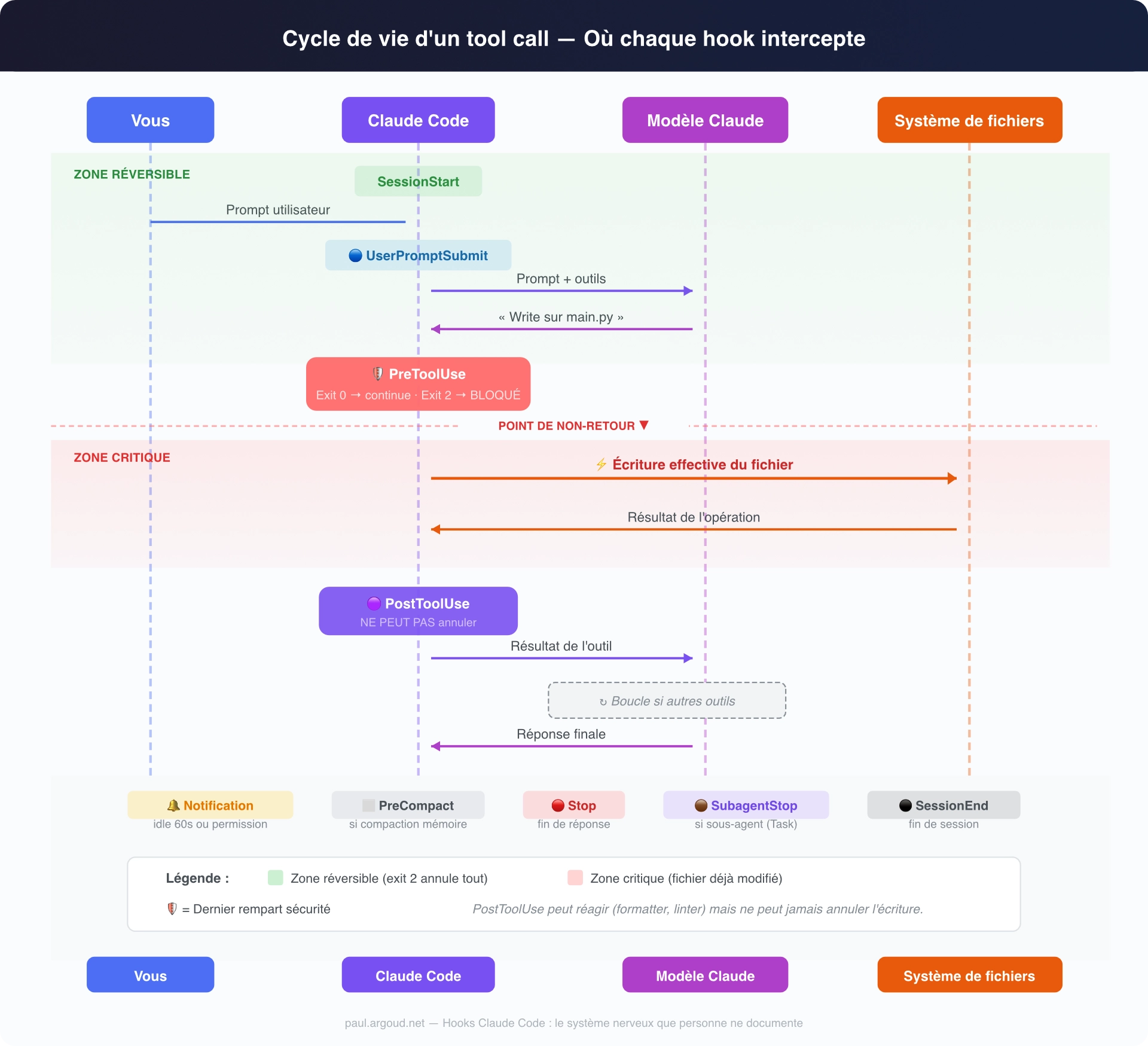
Here is the full lifecycle, with all eight interception points:
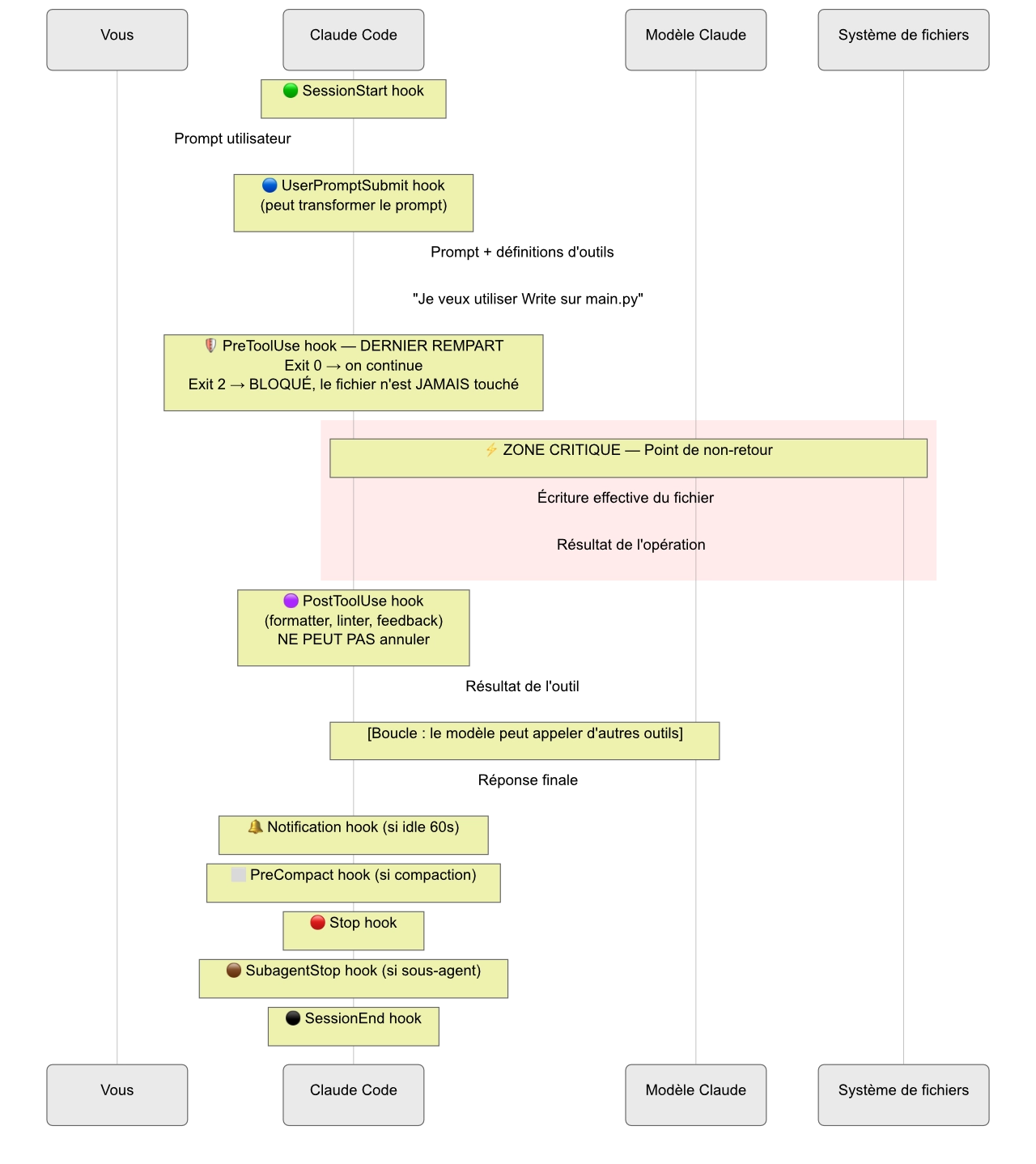
The critical point is the red zone between PreToolUse and the actual write. It’s the last line of defense. Before this zone, everything is reversible: an exit code 2 in your PreToolUse hook is enough to cancel everything, and the file is never touched. After this zone, it’s too late: PostToolUse can run a formatter, flag an error, log the operation, but it can’t rewind. The file is already modified.
This asymmetry is what structures the entire security logic of hooks. Remember it: to protect, it’s always PreToolUse. To react, it’s PostToolUse.
The complete taxonomy: eight hooks, not two
The official documentation and most tutorials only mention PreToolUse and PostToolUse. That’s like explaining HTTP and mentioning only GET and POST. There are in fact eight hook types, each with its own trigger, payload, and capabilities.
1. PreToolUse: The gatekeeper
- When: before any tool runs (Read, Write, Edit, Grep, Bash, and so on).
- Can block: yes (exit code 2).
- Key payload:
tool_name,tool_input. - Use case: protect sensitive files, validate parameters, forbid certain Bash commands.
This is the most used and most powerful hook. When your script returns exit code 2, anything sent to stderr is passed to Claude as the explanation for the block. Claude then understands why the operation was refused and adjusts its behavior.
2. PostToolUse: The quality controller
- When: after a tool runs successfully.
- Can block: no (the tool has already run).
- Key payload:
tool_name,tool_input,tool_response. - Use case: run a formatter, run tests, check types, give Claude feedback.
PostToolUse is your automatic feedback loop. Claude writes code, your hook runs the linter, the errors surface, Claude fixes them, all without your touching the keyboard.
3. Notification: The passive sentinel
- When: when Claude Code sends a notification, or after 60 seconds of inactivity (when Claude needs permission).
- Can block: no.
- Key payload: session information.
- Use case: external alerting (Slack webhook, system notification), monitoring long sessions.
This is the least documented hook and yet the most useful for observability. When Claude has been working for ten minutes on a complex task and finally stops to wait for permission, Notification is what lets you know without watching the terminal. Picture a Slack webhook that pings you when Claude Code has been waiting on your permission for project X for 60 seconds. You answer from your phone. The workflow interruption drops to zero.
For teams running Claude Code semi-autonomously on long tasks (refactoring, code migration, documentation generation), Notification is the key to effective asynchronous supervision.
4. Stop: The end-of-response signal
- When: when Claude Code has finished responding.
- Can block: no.
- Key payload:
stop_hook_active(boolean). - Use case: session logging, triggering post-processing, metrics.
The payload is minimal: it’s a signal, not a data carrier. Use it as a trigger for lightweight operations: write a line to a log file, increment a counter, send a ping.
5. SubagentStop: The subagent supervisor
- When: when a subagent (shown as “Task” in the interface) finishes running.
- Can block: no.
- Key payload: subagent information.
- Use case: validate a subagent’s result, aggregate the results of parallel tasks.
The difference from Stop is subtle but important: Stop fires when the main instance finishes responding, SubagentStop when a delegated task completes. If you orchestrate complex workflows with subagents, this is the hook that gives you visibility into each step.
6. PreCompact: The memory guardian
- When: before a compaction operation, whether manual or automatic.
- Can block: no.
- Key payload: session information.
- Use case: save context before compaction, inject a summary, raise an alert.
Compaction is the moment when Claude Code summarizes the conversation to free up context window. Information is lost. If you’ve worked for two hours with Claude on a complex architecture, compaction will condense those exchanges into a few paragraphs. The nuances, the intermediate decisions, the reasons you rejected a given approach: all of it risks vanishing.
PreCompact lets you step in just before. You can pull the key decisions out of the transcript (available through transcript_path in the payload), save them to a notes file, or inject them into the project’s CLAUDE.md so they survive compaction. It’s memory insurance.
If you read my article on CLAUDE.md, you know that the context window is a scarce resource. PreCompact is the hook that gives you one last word before that resource is compressed.
7. UserPromptSubmit: The input filter
- When: when the user submits a prompt, before Claude processes it.
- Can block: no.
- Key payload: the user prompt.
- Use case: transform, enrich, or filter prompts, add context automatically.
This is the most underrated hook. Picture this: every time you type a prompt, a script automatically enriches your message with the current Jira ticket’s context, the Git branch name, or the state of the last CI build. The prompt Claude receives is richer than the one you typed.
Concretely, you type “fix the validation bug.” Your UserPromptSubmit hook detects that you’re on branch fix/issue-342, fetches the matching ticket title from Jira through the API, and passes Claude an enriched prompt: “Context: branch fix/issue-342, ticket JIRA-342 ‘The contact form rejects emails with a + in the address.’ Fix the validation bug.” Claude works with full context without your having to provide it by hand.
It’s also the ideal hook for normalizing prompts in an enterprise setting: automatically adding a reminder of code conventions, a language prefix (“Always reply in French”), or the current sprint’s context.
8. SessionStart / SessionEnd: The session boundaries
- When: at the start or resume of a session / at the end of a session.
- Can block: no.
- Key payload: session information.
- Use case: environment setup/teardown, starting servers, duration logging, billing.
For freelancers who bill by time spent with Claude Code: a SessionStart hook that writes the start time to a CSV, and a SessionEnd hook that computes the duration. Automatic billing.
Summary table
| Type | Trigger | Can block | Distinctive payload | Primary use case |
|---|---|---|---|---|
| PreToolUse | Before a tool | ✅ (exit 2) | tool_name, tool_input | Security, validation |
| PostToolUse | After a tool | ❌ | + tool_response | Quality, feedback |
| Notification | Notification / idle 60s | ❌ | Session info | Alerting, monitoring |
| Stop | End of response | ❌ | stop_hook_active | Logging, metrics |
| SubagentStop | End of subagent | ❌ | Subagent info | Orchestration |
| PreCompact | Before compaction | ❌ | Session info | Context saving |
| UserPromptSubmit | Prompt submission | ❌ | User prompt | Enrichment |
| SessionStart/End | Session start/end | ❌ | Session info | Setup/teardown |
The stdin payload: the structure nobody documents
The Anthropic Academy course admits it plainly: the structure of the data sent to your hooks varies by type, and you won’t necessarily know what to expect. That’s a problem. Let’s solve it.
The common base
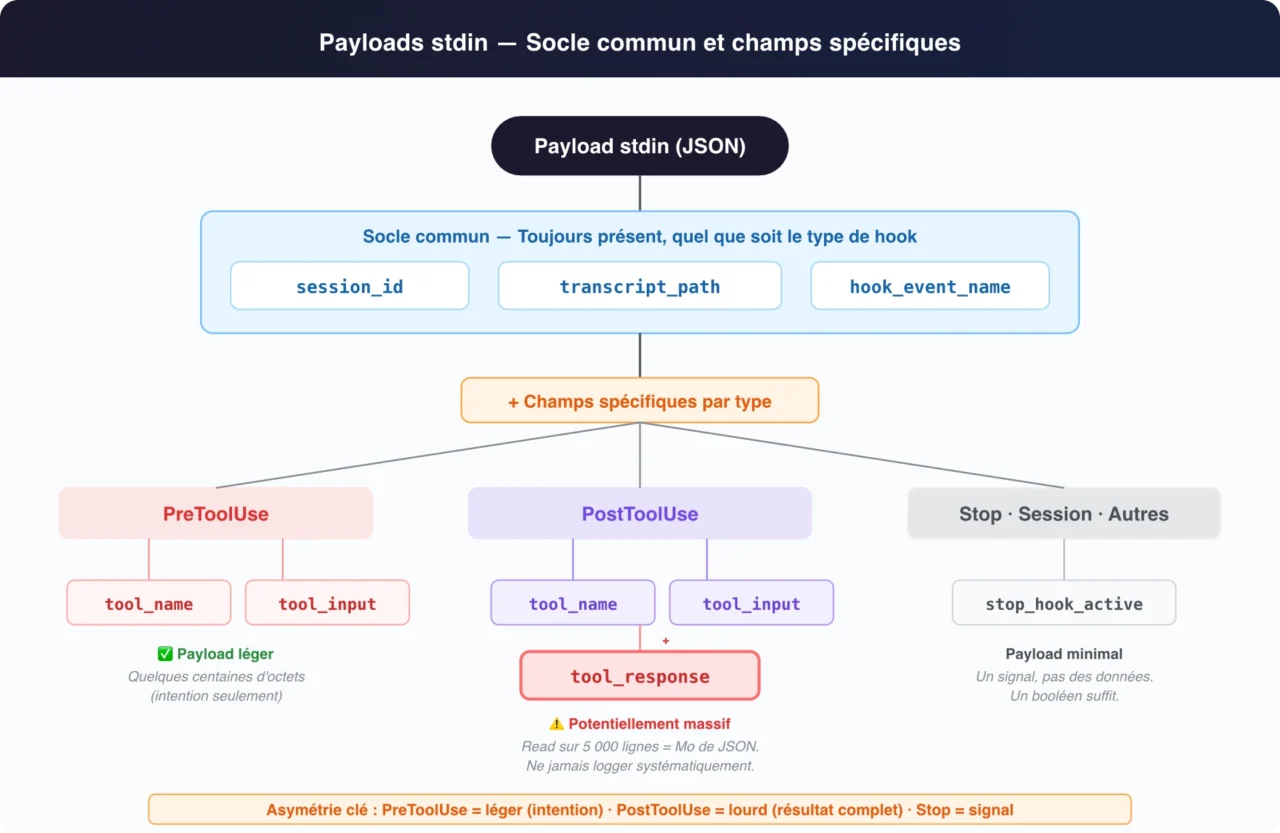
Every hook receives its payload over stdin as JSON. Three fields are always present:
{
  "session_id": "2d6a1e4d-6f3a-4b2c-9e1d-8a7b6c5d4e3f",
  "transcript_path": "/Users/paul/.claude/sessions/2d6a1e4d.transcript",
  "hook_event_name": "PreToolUse"
}
Code language: JSON / JSON with Comments (json)
session_id identifies the current session. transcript_path points to the full transcript file. hook_event_name tells you which hook type fired, indispensable if you use a single script for several types.
Type-specific fields
PreToolUse adds Claude’s intent:
{
  "session_id": "...",
  "transcript_path": "...",
  "hook_event_name": "PreToolUse",
  "tool_name": "Read",
  "tool_input": {
    "file_path": "/code/project/.env"
  }
}
Code language: JSON / JSON with Comments (json)
PostToolUse adds the tool’s result:
{
  "session_id": "...",
  "transcript_path": "...",
  "hook_event_name": "PostToolUse",
  "tool_name": "TodoWrite",
  "tool_input": {
    "todos": [{ "content": "write a readme", "status": "pending" }]
  },
  "tool_response": {
    "oldTodos": [],
    "newTodos": [{ "content": "write a readme", "status": "pending" }]
  }
}
Code language: JSON / JSON with Comments (json)
Stop is minimal:
{
  "session_id": "af9f50b6-f042-4773-b3e2-c3a4814765ce",
  "transcript_path": "...",
  "hook_event_name": "Stop",
  "stop_hook_active": false
}
Code language: JSON / JSON with Comments (json)
The critical asymmetry: PreToolUse vs PostToolUse
PreToolUse’s payload is light: it carries the intent, which tool, which parameters. A few hundred bytes at most.
PostToolUse’s payload is potentially massive: tool_response contains the tool’s complete result. A Read on a 5,000-line file, a Grep with hundreds of matches, a Bash(ls -R) on a large project: all of it lands whole in your hook’s stdin.
The practical consequences are immediate:
Never log tool_response wholesale. A debug hook running jq . >> debug.log on a "*" matcher can generate tens of megabytes within a few minutes of a session. Logging tool_name + tool_input is enough in 95% of cases.
Parse with limits. If your hook analyzes tool_response, truncate beyond a reasonable threshold (10,000 characters, say). Hooks are synchronous: they block the flow while they run. A script that parses 2 MB of JSON on every file write means a sluggish Claude Code session.
The smart logger trick
For debugging, build a catch-all hook that excludes tool_response from the dump:
// hooks/debug-logger.js
async function main() {
  const chunks = [];
  for await (const chunk of process.stdin) {
    chunks.push(chunk);
  }
  const toolArgs = JSON.parse(Buffer.concat(chunks).toString());

  // Exclude tool_response to avoid bloat
  const { tool_response, ...light } = toolArgs;
  const fs = require('fs');
  fs.appendFileSync(
    'hook-debug.log',
    JSON.stringify(light, null, 2) + '\n---\n'
  );
}

main().catch(() => process.exit(0));
Code language: JavaScript (javascript)
Enable it temporarily with a "*" matcher, inspect your payloads, then remove it. Never leave it in production.
Configuration: the three files, the hierarchy, and the fleet strategy
The three levels
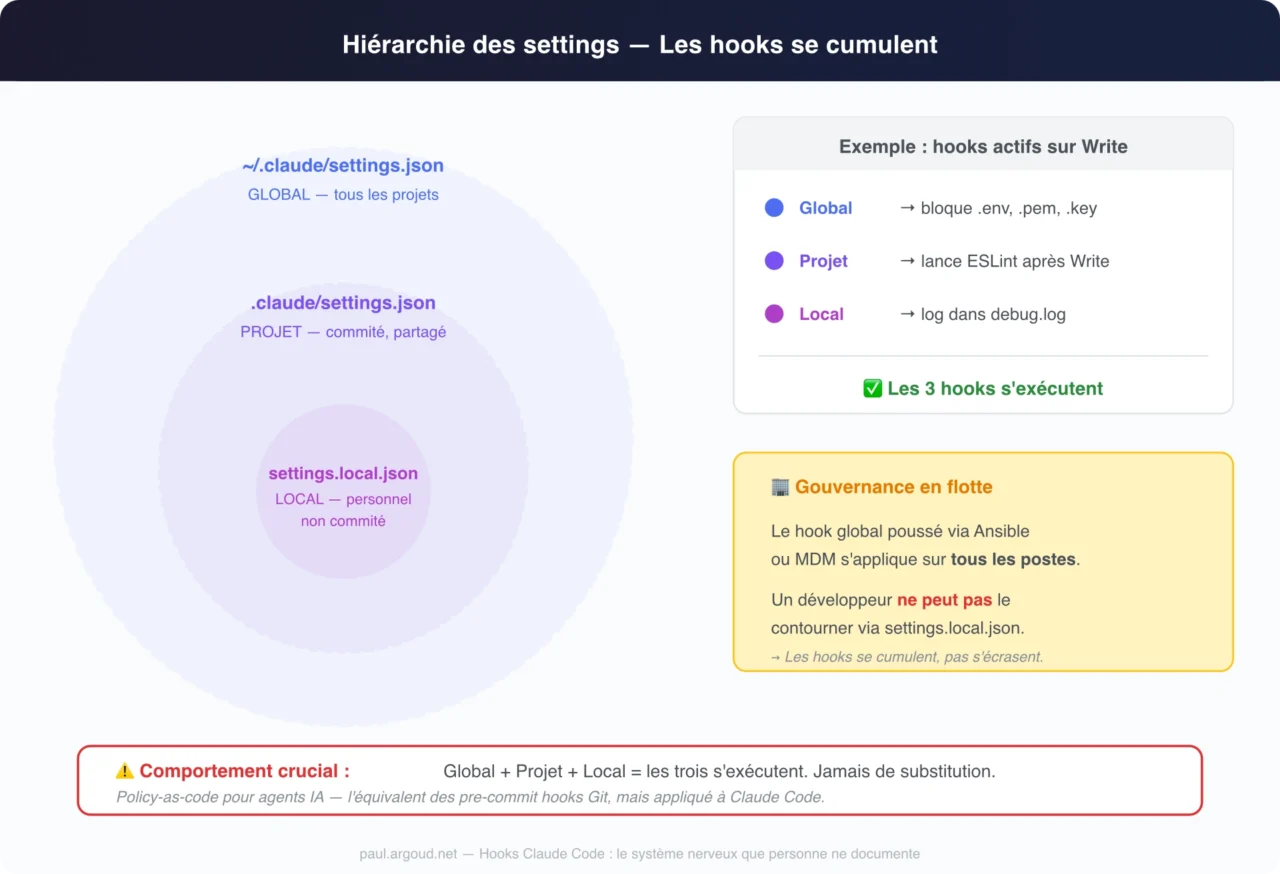
Hooks are declared in JSON files, at three levels of scope:
- Global,
~/.claude/settings.json: applies to all your projects, across the whole machine. This is the place for universal guardrails, for example blocking access to SSH keys regardless of the project. - Project (shared),
.claude/settings.json: committed to the repo, shared with the team. This is the place for project conventions, the linter to run after each edit, the protected directories specific to the project. - Project (local),
.claude/settings.local.json: not committed, in.gitignore. This is the place for your personal preferences, a debug logger, a notification hook to your personal Slack, paths specific to your machine.
Crucial point: hooks from all three levels stack. They don’t overwrite each other. A hook declared at the global level AND a hook declared at the project level both run when the same tool is called. It’s a deliberate architectural decision with major consequences, which we’ll come back to in the “agent fleet” section.
The /hooks command in Claude Code offers an interactive interface for creating your hooks without editing the JSON by hand. It’s handy for getting started, but for advanced configurations, editing the files directly remains essential.
JSON structure of a complete configuration
{
  "hooks": {
    "PreToolUse": [
      {
        "matcher": "Read|Grep",
        "hooks": [
          {
            "type": "command",
            "command": "node /home/paul/projects/myapp/hooks/env-guard.js"
          }
        ]
      }
    ],
    "PostToolUse": [
      {
        "matcher": "Write|Edit|MultiEdit",
        "hooks": [
          {
            "type": "command",
            "command": "node /home/paul/projects/myapp/hooks/format-check.js"
          }
        ]
      }
    ]
  }
}
Code language: JSON / JSON with Comments (json)
The matcher uses a regex syntax where the pipe | acts as an OR operator. A few common patterns: "Read" (a single tool), "Read|Grep" (read and search), "Write|Edit|MultiEdit" (all writes), "*" (catch-all, every tool).
The absolute-path trap
The documentation recommends using absolute paths in commands, and it’s right. Relative paths expose your hooks to path traversal and binary planting: a malicious file in the current directory could substitute itself for your script.
But absolute paths create another problem: your .claude/settings.json, committed to the repo, contains /home/paul/projects/myapp/hooks/env-guard.js. Your colleague clones the repo to /Users/sophie/dev/myapp/. The path no longer matches. The hook doesn’t fire. No visible error.
The Anthropic Academy course proposes an elegant solution: a settings.example.json file with a $PWD placeholder, and an init script that performs the substitution:
// scripts/init-claude.js
const fs = require('fs');
const path = require('path');
const projectRoot = process.cwd();

const template = fs.readFileSync('.claude/settings.example.json', 'utf8');
const resolved = template.replaceAll('$PWD', projectRoot);
fs.writeFileSync('.claude/settings.local.json', resolved);
Code language: JavaScript (javascript)
Add node scripts/init-claude.js to your npm run setup and every developer gets correct absolute paths on first clone. It’s the .env.example / .env pattern applied to Claude Code hooks.
The “agent fleet” dimension: hooks as a governance tool
Let’s step back. You’re a CTO. Forty developers use Claude Code every day. How do you guarantee that:
- no agent touches
.env,credentials.*, or API keys; - every change goes through the in-house linter;
- access to sensitive directories (
/infra/,/deploy/) is logged.
The answer lies in the hierarchy of configuration files.
Project level: commit a .claude/settings.json into each repo with the compliance hooks. Every developer who clones the project automatically inherits the guardrails. This is policy-as-code applied to AI agents.
Global level: push a ~/.claude/settings.json through your configuration management tool: Ansible, Chef, Puppet, or an MDM for macOS. This global hook applies to all projects, on all machines. And since hooks stack rather than overwrite, a developer can’t bypass the global hook by adding an exception in their settings.local.json.
It’s the equivalent of Git pre-commit hooks pushed through .pre-commit-config.yaml, but applied to the AI agent itself rather than to the human developer. The agent becomes auditable, framed, governed, without sacrificing its productivity. The developer keeps full freedom of prompting and full access to tools, but within a framework defined by the organization.
It’s probably the most concrete answer to the question every CIO asks: how do we deploy Claude Code at scale without losing control? And the answer comes down to three levels of JSON files and a few 20-line Node.js scripts.
One last point for architects: remember to document your governance hooks in the global CLAUDE.md. Claude Code reads CLAUDE.md before every session. If you state there that the project uses PreToolUse hooks that block access to sensitive files and that the model should not attempt to circumvent this protection, Claude folds that information into its behavior. Hooks block mechanically. CLAUDE.md aligns intent. The two reinforce each other.
Five production hooks: from formatter to multi-agent
The theory is set. Let’s get to the code.
Hook 1: Protecting sensitive files (PreToolUse)
The classic. Stop Claude from reading your .env files, your private keys, your credentials.
// hooks/env-guard.js
// PreToolUse - Matcher: "Read|Grep"
async function main() {
  const chunks = [];
  for await (const chunk of process.stdin) {
    chunks.push(chunk);
  }
  const toolArgs = JSON.parse(Buffer.concat(chunks).toString());

  // Extract the target path (Read uses file_path, Grep uses path)
  const targetPath = toolArgs.tool_input?.file_path
    || toolArgs.tool_input?.path
    || "";

  // List of forbidden patterns
  const forbidden = ['.env', '.pem', '.key', 'credentials', '/secrets/'];
  const match = forbidden.find(p => targetPath.includes(p));

  if (match) {
    // stderr is passed to Claude as the explanation
    console.error(`⛔ Access blocked: file "${targetPath}" matches the forbidden pattern "${match}".`);
    process.exit(2); // Exit 2 = block the operation
  }

  // Exit 0 = allow it through
  process.exit(0);
}

main().catch(() => process.exit(0));
Code language: JavaScript (javascript)
The matching configuration in .claude/settings.local.json:
{
  "hooks": {
    "PreToolUse": [
      {
        "matcher": "Read|Grep",
        "hooks": [{
          "type": "command",
          "command": "node /absolute/path/hooks/env-guard.js"
        }]
      }
    ]
  }
}
Code language: JSON / JSON with Comments (json)
When Claude tries to read .env, it receives the error message and understands the operation was refused by a hook. It adjusts its behavior and doesn’t retry.
Hook 2: Auto-formatter after editing (PostToolUse)
Every time Claude modifies a file, Prettier reformats it automatically.
// hooks/auto-format.js
// PostToolUse - Matcher: "Write|Edit|MultiEdit"
const { execSync } = require('child_process');

async function main() {
  const chunks = [];
  for await (const chunk of process.stdin) {
    chunks.push(chunk);
  }
  const toolArgs = JSON.parse(Buffer.concat(chunks).toString());

  // Extract the path of the modified file
  const filePath = toolArgs.tool_input?.file_path
    || toolArgs.tool_input?.path
    || "";

  if (!filePath) {
    process.exit(0);
  }

  // Only format supported files
  const supported = ['.js', '.ts', '.jsx', '.tsx', '.css', '.json', '.md'];
  const ext = filePath.substring(filePath.lastIndexOf('.'));
  if (!supported.includes(ext)) {
    process.exit(0);
  }

  try {
    execSync(`npx prettier --write "${filePath}"`, {
      timeout: 10000,  // 10 seconds max, hooks are synchronous
      stdio: 'pipe'
    });
  } catch (err) {
    // On failure, don't block, just report
    console.error(`⚠️ Prettier failed on ${filePath}: ${err.message}`);
  }

  process.exit(0);
}

main().catch(() => process.exit(0));
Code language: JavaScript (javascript)
Adaptable to any tool: ESLint with --fix, PHP-CS-Fixer, Black for Python, gofmt for Go. The pattern is always the same: extract the path, check the extension, run the formatter with a timeout.
Hook 3: Continuous type checker (PostToolUse)
This is the hook that turns Claude Code into a disciplined developer. After every TypeScript file change, the compiler checks the types and hands the errors back to Claude.
// hooks/type-check.js
// PostToolUse - Matcher: "Write|Edit|MultiEdit"
const { execSync } = require('child_process');

async function main() {
  const chunks = [];
  for await (const chunk of process.stdin) {
    chunks.push(chunk);
  }
  const toolArgs = JSON.parse(Buffer.concat(chunks).toString());

  const filePath = toolArgs.tool_input?.file_path || "";

  // Only check TypeScript files
  if (!filePath.endsWith('.ts') && !filePath.endsWith('.tsx')) {
    process.exit(0);
  }

  try {
    execSync('npx tsc --noEmit', {
      timeout: 30000,
      stdio: 'pipe'
    });
  } catch (err) {
    // tsc returns a non-zero code when there are errors
    // stdout holds the type errors
    const errors = err.stdout?.toString() || err.message;
    // Feedback sent back to Claude via stdout
    console.log(`TypeScript found errors after modifying ${filePath}:\n${errors}\nFix these errors in the affected files.`);
  }

  process.exit(0);
}

main().catch(() => process.exit(0));
Code language: JavaScript (javascript)
The Anthropic Academy course identifies the exact problem this hook solves: when Claude changes a function signature in schema.ts, it often forgets to update the calls in main.ts. The type checker catches the error immediately and Claude fixes it right away, without your lifting a finger.
For PHP, replace tsc --noEmit with php vendor/bin/phpstan analyse. For typed Python, mypy .. The principle is universal.
Hook 4: Detecting duplicate code via multi-agent (PostToolUse + SDK)
This is the most advanced pattern in the course. A hook that launches a second instance of Claude Code to do automatic code review. If you read Society of minds: when AI models debate each other, you know the multi-agent concept in theory. Here, we put it into practice.
The scenario: you have a ./queries/ directory with dozens of SQL functions. You ask Claude to “build a Slack integration that alerts on orders pending for more than 3 days.” Claude, focused on the Slack task, writes a brand-new SQL query instead of reusing the getPendingOrders() function that already exists.
The hook intercepts every change in ./queries/, launches a read-only Claude Code instance through the SDK, asks it to check for duplication, and returns the verdict to the main instance.
// hooks/duplicate-check.js
// PostToolUse - Matcher: "Write|Edit|MultiEdit"
import { query } from "@anthropic-ai/claude-code";

async function main() {
  const chunks = [];
  for await (const chunk of process.stdin) {
    chunks.push(chunk);
  }
  const toolArgs = JSON.parse(Buffer.concat(chunks).toString());

  const filePath = toolArgs.tool_input?.file_path || "";

  // Only watch the queries directory
  if (!filePath.includes('/queries/')) {
    process.exit(0);
  }

  // Sentinel variable to prevent recursion
  if (process.env.CLAUDE_HOOK_CONTEXT === 'review') {
    process.exit(0);
  }

  // Launch a second, read-only instance
  process.env.CLAUDE_HOOK_CONTEXT = 'review';

  const prompt = `Examine the file ${filePath} that was just modified.
Compare it with the other files in ./queries/.
Are there any duplicated or very similar functions?
If so, indicate which existing function should be reused.
Respond only with the result of your analysis.`;

  let result = '';
  for await (const message of query({ prompt })) {
    if (message.type === 'text') {
      result += message.text;
    }
  }

  if (result.toLowerCase().includes('duplicat') || result.toLowerCase().includes('similar')) {
    console.log(`⚠️ Potential duplication detected in ${filePath}:\n${result}`);
  }

  process.exit(0);
}

main().catch(() => process.exit(0));
Code language: JavaScript (javascript)
A point to watch: the scope of process.env. In this code, process.env.CLAUDE_HOOK_CONTEXT = 'review' works because the SDK’s query() function in Node.js automatically inherits the parent process’s environment: variables defined before the call are passed to the SDK instance. But if you port this pattern to Python or Bash (launching Claude Code through claude --print in a subprocess), the environment variable must be explicitly exported before the call: export CLAUDE_HOOK_CONTEXT=review in Bash, or passed through the env parameter of subprocess.run() in Python. Without that, the subprocess never sees the sentinel, and your anti-recursion protection silently does nothing.
The trade-offs are real: each check consumes API tokens and adds latency. An SDK review can take 10 to 30 seconds and cost a few cents. On a project where Claude modifies the queries/ directory ten times in a session, that adds up to a few minutes of cumulative latency and a few dozen cents. Reserve this hook for critical directories, the ones where duplication carries a real business cost (SQL functions, business rules, infrastructure configurations).
For less critical directories, the type checker (hook #3) offers a far better cost/benefit ratio: it’s local, instant, and free.
Hook 5: Session logger for billing (SessionStart + SessionEnd)
// hooks/session-logger.js
// SessionStart AND SessionEnd - Matcher: "*"
const fs = require('fs');
const path = require('path');

async function main() {
  const chunks = [];
  for await (const chunk of process.stdin) {
    chunks.push(chunk);
  }
  const toolArgs = JSON.parse(Buffer.concat(chunks).toString());

  const logFile = path.join(process.env.HOME, '.claude/session-log.csv');
  const now = new Date().toISOString();

  if (toolArgs.hook_event_name === 'SessionStart') {
    fs.appendFileSync(logFile, `${toolArgs.session_id},start,${now}\n`);
  }

  if (toolArgs.hook_event_name === 'Stop' || toolArgs.hook_event_name === 'SessionEnd') {
    fs.appendFileSync(logFile, `${toolArgs.session_id},end,${now}\n`);
  }

  process.exit(0);
}

main().catch(() => process.exit(0));
Code language: JavaScript (javascript)
A CSV with session_id, event, timestamp. A post-processing script computes the durations per session, aggregating by day or by project. For freelancers who bill by time spent, this is the foundation of automatic, verifiable billing: no more Toggl or manual timers, Claude Code documents itself.
For teams, the same mechanism lets you measure adoption: how many sessions per day, what the average duration is, which projects consume the most Claude Code time. Concrete metrics, with no data entry.
The TypeScript SDK: when a hook isn’t enough
Hook #4 above uses the @anthropic-ai/claude-code SDK. It’s the bridge between hooks (reactive) and programmatic automation (proactive).
The essentials in 60 seconds
The SDK runs the same Claude Code as your terminal, but from code. Same model, same tools, same filesystem access. The difference: no interactive interface. Everything goes through programmatic calls.
Note: the
@anthropic-ai/claude-codepackage was recently renamed@anthropic-ai/claude-agent-sdk. The imports change, but the API stays identical. The migration guide is trivial: a search-and-replace on the imports is all it takes.
import { query } from "@anthropic-ai/claude-code";

const prompt = "Analyze the files in ./src/queries to find duplications";

for await (const message of query({ prompt })) {
  console.log(JSON.stringify(message, null, 2));
}
Code language: JavaScript (javascript)
The query() function returns an async iterator that streams the conversation’s messages in real time. Each message is a typed object: text, tool call, tool result. The last message holds Claude’s final answer. For most use cases inside hooks, you only care about that last message: the review verdict, the duplication analysis, the check result.
By default, the SDK runs read-only: Read, Grep, Glob, LS. No Write, no Edit, no Bash. It’s a deliberate design choice, and an excellent security choice, especially when the SDK is triggered by a hook (we’ll see why in the next section).
To unlock additional tools, add allowedTools:
for await (const message of query({
  prompt,
  options: {
    allowedTools: ["Edit", "Write"]
  }
})) {
  // ...
}
Code language: JavaScript (javascript)
An often overlooked point: the SDK automatically inherits the settings of the current directory. Your SDK instance respects the same CLAUDE.md, Skills, hooks, and permissions as your terminal instance. That means if you have a PreToolUse hook blocking access to .env, an SDK instance triggered by another hook will respect that block too. The architecture is consistent end to end.
Python and CLI SDKs exist too, but TypeScript remains the most mature and the best documented by Anthropic.
The recursion trap: the infinite hooks ↔ SDK loop
Here’s the worst-case scenario nobody documents.
You have a PostToolUse hook watching writes in ./queries/. When it detects a change, it launches a Claude Code instance through the SDK for review. That second instance decides to fix the file, which triggers the same PostToolUse hook, which relaunches the SDK, which re-edits, which re-triggers, and so on.
Infinite loop. API billing in free fall. And nobody in the official documentation warns you.
Three protection strategies:
Strategy 1: The SDK’s read-only mode (recommended). By default, the SDK can neither write nor edit. If your review instance only reads and analyzes, it fires no PostToolUse hook on Write/Edit. It’s the cleanest solution. Only unlock allowedTools: ["Edit"] if you know exactly what you’re doing.
Strategy 2: The sentinel environment variable. Set a variable before launching the SDK instance, and check it at the start of every hook:
// At the start of EVERY hook
if (process.env.CLAUDE_HOOK_CONTEXT === 'review') {
  process.exit(0); // Review instance → don't re-trigger
}

// Before launching the SDK
process.env.CLAUDE_HOOK_CONTEXT = 'review';
Code language: JavaScript (javascript)
It’s the same pattern backend developers use to avoid infinite loops in webhooks or database triggers. Simple, effective, but fragile if someone forgets to set the variable.
Strategy 3: The lock file. Create a .claude-hook-running at the start of the hook, check whether it exists before running, delete it at the end. A classic mutual-exclusion pattern, but watch out for crashes that leave the lock in place.
Recommendation: combine read-only mode (strategy 1) with the sentinel (strategy 2). Belt and suspenders. Hook #4 in the previous section applies exactly this double protection.
GitHub Actions: hooks in the cloud
So far, everything happens locally. But Claude Code can also run inside GitHub Actions, and the rules of the game change fundamentally.
Setup
The /install-github-app command in Claude Code launches a wizard that walks you through it step by step: installing the Claude Code app on your GitHub account, configuring your Anthropic API key as a repository secret, and generating a pull request containing two ready-to-use GitHub Actions workflow files. Once that PR is merged, the workflows are live.
It’s remarkably simple to deploy, and that’s precisely why you need to understand what you’re deploying before you merge.
The two default workflows
The mention bot: mention @claude in any issue or pull request. Claude analyzes the request, creates an action plan, executes the task with access to the full codebase, and replies directly in the GitHub thread. You can ask it to fix a bug described in an issue, implement a feature, or perform a code analysis. Claude creates its own branch, makes its changes, and submits a PR, all from a GitHub comment.
The automatic review: on every pull request, Claude analyzes the changes, assesses their impact, identifies potential problems, and posts a detailed report right on the PR. It’s AI-assisted code review, natively integrated into your Git flow. No need to wait for a colleague to be available for a first pass: Claude does the initial screening in minutes.
Customizing the workflows
The YAML workflows accept three essential customization parameters:
custom_instructions to inject project context:
custom_instructions: |
  The project is set up with all dependencies installed.
  The server is already running on localhost:3000.
  Logs are in logs.txt.
  Use sqlite3 for DB queries if needed.
Code language: YAML (yaml)
mcp_config to add MCP servers:
mcp_config: |
  {
    "mcpServers": {
      "playwright": {
        "command": "npx",
        "args": ["@playwright/mcp@latest", "--allowed-origins", "localhost:3000"]
      }
    }
  }
Code language: JavaScript (javascript)
allowed_tools for the explicit list of permitted tools:
allowed_tools: "Bash(npm:*),Bash(sqlite3:*),Read,Grep,Glob,Write,Edit"
Code language: JavaScript (javascript)
The contrast that changes everything: locally, someone says “Yes”; in CI, nobody
In local development, Claude Code runs interactively. It asks for permission, you say “Yes,” and the reflex sets in. You end up approving on autopilot. That’s human.
In GitHub Actions, there’s nobody to say “Yes.” Every tool must be pre-authorized explicitly in the YAML configuration, or it’s silently refused. The allowed_tools list is your only contract of trust with the agent.
The recommended restrictive pattern:
For automatic code review (PR): allow only read tools, Read, Grep, Glob, LS. Claude analyzes and comments, but touches nothing. Modification stays a human decision.
For the mention bot (issues): extend with Write and Edit, but list every MCP tool explicitly (mcp__playwright__browser_snapshot, mcp__playwright__browser_click, and so on). No wildcards.
Never Bash(*) in CI. Always prefix: Bash(npm:*), Bash(sqlite3:*), Bash(python:*). A Bash(*) in CI is a root shell handed to an autonomous agent in an environment with no human supervision. Read that sentence again. Slowly. Think of your repository secrets, your access tokens, the production environment variables flowing through GitHub Actions. An agent with an unrestricted Bash(*) could, in theory, exfiltrate that data into a commit or print it in a log.
The complementarity between local hooks and GitHub Actions permissions is natural and powerful: local hooks (PreToolUse) protect the developer during day-to-day work. GitHub Actions permissions (allowed_tools) protect the repository when the agent runs unsupervised. Two lines of defense, two contexts, one shared goal: keeping control over what the agent can do.
Security: what hooks must never do
Hooks are code that runs automatically in your development environment. They have access to the filesystem, environment variables, the network. Their attack surface deserves serious attention.
Absolute paths, always. The documentation insists, and rightly so. A relative path in your command (node ./hooks/guard.js) resolves from the current working directory. If a malicious file named guard.js lands in that directory (through a clone, a download, an unlucky copy-paste), it runs in place of your script. Path traversal and binary planting aren’t theoretical threats. In a context where Claude Code manipulates files and runs commands, a compromised hook is an open door onto your machine.
Quote your shell variables systematically. "$VAR", never $VAR. A file path containing spaces or special characters can turn a harmless command into command injection. It’s Security 101, but in the context of hooks, where tool_input comes from the AI model’s decisions, it’s all the more critical. Claude builds file paths from its analysis of the codebase. A malicious prompt could lead it to construct a path containing escape characters.
Block path traversal. Check for .. in paths extracted from tool_input. Also verify that the resolved path (via path.resolve()) stays inside the project tree. Claude is generally well intentioned, but a sophisticated prompt injection could push it to build a path that escapes the authorized directory.
Never log secrets. A hook that writes raw tool_input to a log file potentially exposes the arguments of Bash commands containing tokens, passwords, or API keys. Filter before logging. Better still: log only tool_name and a hash of the path, never the content.
Files to exclude systematically in your protection hooks: .env, .env.*, .env.local, .git/, *.key, *.pem, *.p12, *.pfx, credentials.*, *secret*, id_rsa, id_ed25519, *.keystore, token.json, service-account.json. Every project has its own sensitive files, so adapt this list, but start from this baseline.
PreToolUse for security, always. This is the most important point in this whole section. If you remember only one sentence from this article, make it this one. PostToolUse comes after the tool runs. If Claude has read your .env, the content is already in the model’s context window, and your PostToolUse hook can’t pull it back out. If Claude has run rm -rf, the files are already gone. Protection happens before, never after. PostToolUse is a quality tool. PreToolUse is a security tool. Don’t confuse the two.
Troubleshooting: the errors you’ll run into
The hook doesn’t fire. Check three things in order: does the matcher match the tool’s exact name (it’s case-sensitive: Read, not read, not READ)? Is the hook in the right settings file (global vs project vs local)? Did you restart Claude Code after the change? Hooks load at session startup, not on the fly. If you modify a settings file during an active session, the changes won’t take effect until the next session. It’s the most common trap.
The hook fires but doesn’t block. Check that your script really returns exit code 2. A process.exit(1) doesn’t block: only code 2 is interpreted as an explicit block by Claude Code. A process.exit(1) is treated as an error in the hook itself, not as a blocking decision. And check that it really is a PreToolUse hook: PostToolUse, Stop, Notification, and all the others can’t block, whatever the exit code.
JSON parsing error. stdin can be empty or malformed if the hook fires on an unexpected event. Always wrap your parsing in a try/catch, and return exit code 0 on error: a hook that crashes must never block Claude Code:
main().catch((err) => {
  console.error(`Hook error: ${err.message}`);
  process.exit(0); // Don't block on crash
});
Code language: JavaScript (javascript)
This line is the most important in all your hook scripts. Without it, a malformed JSON or a missing field crashes your hook with exit code 1, which disrupts the flow for no reason.
The hook slows everything down. Hooks are synchronous and block the execution flow. A tsc --noEmit on a large TypeScript project takes 15 seconds? Every file write will take 15 seconds longer. Multiply that by the dozens of writes in a productive session and you see the problem. Solutions: add a strict timeout (execSync with the timeout: 10000 option), narrow your matchers (only check types on .ts files, not on everything), or move heavy checks into a Stop hook that runs once at the end of the response rather than on every tool.
Node.js permissions. On macOS and Linux, make sure your script is executable: chmod +x hooks/my-hook.js. Otherwise, use node /absolute/path/hooks/my-hook.js explicitly in the command rather than calling the script directly. On some environments, the #!/usr/bin/env node shebang on the script’s first line is also necessary.
The hook works locally but not in CI. In GitHub Actions, hooks declared in .claude/settings.local.json aren’t available (that file isn’t committed). Only the hooks in .claude/settings.json (project level) are active. Also check that your scripts’ dependencies (Node.js, npm packages) are installed in the CI environment.
The hook runs but you see nothing. This is the most baffling trap for beginners. When a hook returns exit code 0 (success), Claude Code doesn’t print its stdout in the terminal. Your console.log("Hook ran!") is swallowed silently. Only the stderr of blocking hooks (exit 2) is visible: it’s passed to Claude as the explanation. If you want to observe a hook’s behavior without blocking the flow, your only option is to write to an external log file, exactly like the debug-logger.js shown earlier. An fs.appendFileSync('hook.log', ...) plus a tail -f hook.log in a second terminal: that’s the reliable way to debug a hook that “does nothing.”
Validation checklist
Before deployment
- [ ] The hook type is the right one (PreToolUse to block, PostToolUse to react)
- [ ] The matcher targets the right tools (check the case:
Write, notwrite) - [ ] The command path is absolute
- [ ] The script parses stdin defensively (try/catch)
- [ ] The script handles the case where
tool_inputis missing or incomplete - [ ] A timeout is set for external commands (
execSyncwithtimeout)
During development
- [ ] The temporary logger hook (
jq . > debug.log) is installed to inspect the payloads - [ ] The exit codes are correct: 0 to allow through, 2 to block (PreToolUse only)
- [ ] The error messages (stderr) are clear, Claude reads them and adjusts its behavior
- [ ] The
CLAUDE_HOOK_CONTEXTsentinel variable is in place if the hook uses the SDK
After deployment
- [ ] The hook has been tested with edge cases (files with spaces, deep paths, large payloads)
- [ ] Performance has been checked (the hook adds no more than 2-3 seconds per tool)
- [ ] The hook is documented in the project’s CLAUDE.md (so Claude knows it exists)
- [ ] The temporary logger hook has been removed
- [ ] Production logs exclude
tool_response
Final word
CLAUDE.md gives the memory. SKILL.md gives the procedures. Hooks give the reflexes.
Together, these three layers turn Claude Code from a conversational assistant into a semi-autonomous development agent. An agent that knows who you are (CLAUDE.md), knows how to work (Skills), and reacts in real time to its own actions (hooks). All of it with no GUI, no cloud configuration, no vendor lock-in: three Markdown and JSON files in your repo, and that’s it. The dispossession of developers isn’t inevitable: it’s a matter of architecture.
Hooks are also the entry point to multi-agent orchestration. When a hook triggers the SDK, which launches a read-only subagent to check the main agent’s work, we’re no longer talking about assistance. We’re talking about automated supervision. And when that architecture is deployed through GitHub Actions on every pull request, with minimal permissions and explicit guardrails, we’re talking about AI governance at scale.
What strikes me, having dissected this architecture to write these three articles, is how simple the primitives are. A Markdown file. A folder with a script. A JSON config with a regex matcher. No proprietary framework, no obscure SDK, no API with 47 endpoints. Text files, JSON, and code that reads stdin and returns an exit code. It’s Unix to the core.
And maybe that’s why so few people tap its potential. We expect a dashboard, a wizard, a configuration UI. We don’t expect the answer to be a 20-line Node.js script that parses JSON and returns process.exit(2).
The official documentation devotes half a page to it. You’ve just read the rest.
Resources
- Anthropic official documentation, Hooks: The starting point, necessary but insufficient
- Course “Claude Code in Action”, Anthropic Academy: 7 lessons on hooks, the SDK, and GitHub Actions
@anthropic-ai/claude-agent-sdkon npm: The package for programmatic use (formerly@anthropic-ai/claude-code)anthropics/claude-code-actionon GitHub: The official GitHub Actions action- CLAUDE.md: the file Claude Code reads before your code: First installment of the trilogy
- SKILL.md: the ultimate guide to building your Claude Skills: Second installment of the trilogy